




I’ve always believed that guessing is the most expensive business strategy you can have. Yet, I still see founders pouring time and money into campaigns without truly knowing who their customers are or what they want.
That’s where top market research tools come in, not as “nice-to-have” extras, but as the compass that keeps you from wandering in the dark. Over the years, I’ve tested dozens of them, some game-changing, some forgettable. The right tool can uncover the trends you didn’t see coming, validate your next big move, and even save you from costly mistakes.
In this guide, I’m sharing the ones I’ve used, what they’re best at, and how they’ve shaped my decisions, so you can choose smarter, move faster, and win bigger.
Let’s dive in.
How did I test these market research tools?
I know how important market research tools are and that you can’t just pick any tool without knowing what’s under the hood. We all know the consequences of choosing the wrong one: Endless rework, wasted hours, and decisions made on shaky data.
That’s exactly why I’ve put in the effort to create this list—so you can save time, skip the guesswork, and get straight to results.
Every tool here has been part of my business analysis work. Some I discovered through recommendations from other founders, tested personally, and found to deliver great results.
Others I came across while analyzing business plans, and noticed they were already being used successfully by other businesses. It’s a tried, tested, and trusted lineup of tools that real people are using right now to get powerful results.
Ready to roll?
10 Top market research tools (Backed by hands-on testing)
I’ve learned this the hard way—market research isn’t about having more data, it’s about having the right data in the right format. So choose the tool that not only gives you insights but also fits seamlessly into the bigger picture of your business planning.
Let’s begin.
| Tools | Best For | Key use case | |
|---|---|---|---|
 Upmetrics Upmetrics |
Business Planning Research | Drafting data-backed business plans | |
 Statista Statista |
Enterprises & Researchers | Accessing reliable industry stats | |
 Google Forms Google Forms |
Small Businesses & Teams | Collecting quick customer feedback | |
 GWI GWI |
Enterprises & Marketers | Understanding global consumer behavior | |
 Google Analytics Google Analytics |
Startups & SMBs | Tracking website visitors & engagement | — |
 Ahrefs Ahrefs |
Startups & Agencies | Finding competitor keywords & backlinks | |
 Sprout Social Sprout Social |
Small & Mid-size Businesses | Analyzing social engagement patterns | |
 BuzzSumo BuzzSumo |
Marketers & Agencies | Spotting trending content ideas | |
 Tableau Tableau |
Enterprises & Data Teams | Visualizing complex datasets | |
 AnswerThePublic AnswerThePublic |
Startups & Content Creators | Discovering real search questions |
1. Upmetrics: AI research assistance
| Section | Details |
|---|---|
| Audience | Startups, small businesses, entrepreneurs, and consultants |
| Rating | ⭐⭐⭐⭐⭐4.9/5 |
| Key Strength | Combines market research with planning and forecasting |
| Best For | Founders who want an all-in-one business planning |
| Pricing | From $14/month |
Now, I know what you might be thinking: Upmetrics isn’t primarily a market research tool. And you’re right.
Upmetrics is best known as a business planning platform, trusted by thousands of entrepreneurs for its AI-powered tools and resources.
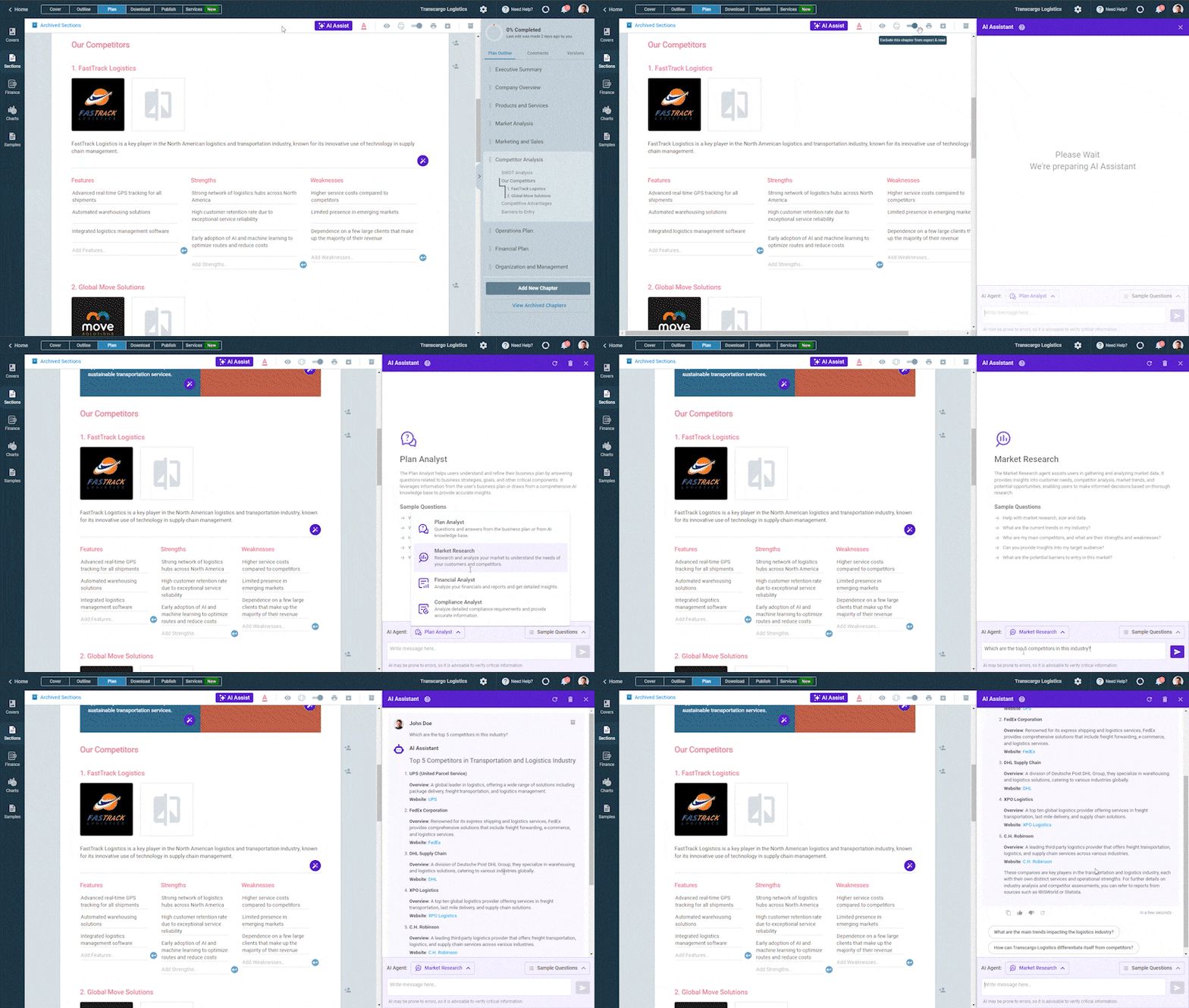
But recently, we rolled out something new that I’m genuinely excited about: An AI market research assistant built right into the platform.
I know what you’re thinking—I’m promoting this because I’m associated with the company. Maybe yes! However, it plays a relatively small role, accounting for 20%. But 80% of why I’m sharing this comes from real hands-on experience.
Typically, market research involves hours of sifting through reports, verifying sources, and assembling data. With our AI research assistant, all we need to answer a few guided questions about the industry, target audience, and goals, and within minutes, we get a structured research report ready.
I also love that we, at Upetrics, don’t stop at just market research. Once the insights are ready, our software helps you take the next step—building a solid business plan around that data.
You don’t have to flip between endless documents, spreadsheets, and templates. Everything is right there in one place: Research, strategy, and planning connected seamlessly.
Lastly, what makes Upmetrics stand out from other tools for me is its features, which are as follows:
- Strategy, compliance, and financial analysis tools to keep your plans accurate and aligned.
- Financial forecasting tools to project revenue, expenses, and cash flow.
- Collaboration features so teams can plan and refine together in real time.
- Customizable reports & templates that investors and stakeholders actually want to read.
“Upmetrics provides AI-assisted research, but needs paid version—best for all business sizes needing an affordable yet effective research assistant”
Spending hours conducting market research?
Gather Accurate Market Insights Using AI Research Assist
Plans starting from $14/month
2. Statista: Industry and market data
| Section | Details |
|---|---|
| Audience | Entrepreneurs, researchers, analysts, and marketing teams |
| Rating | ⭐⭐⭐⭐⭐ 4.8/5 |
| Key Strength | Comprehensive, credible statistical database |
| Best For | Getting reliable data and forecasts across industries |
| Pricing | Starter $199/month Personal $599/month Professional $1,299/month |
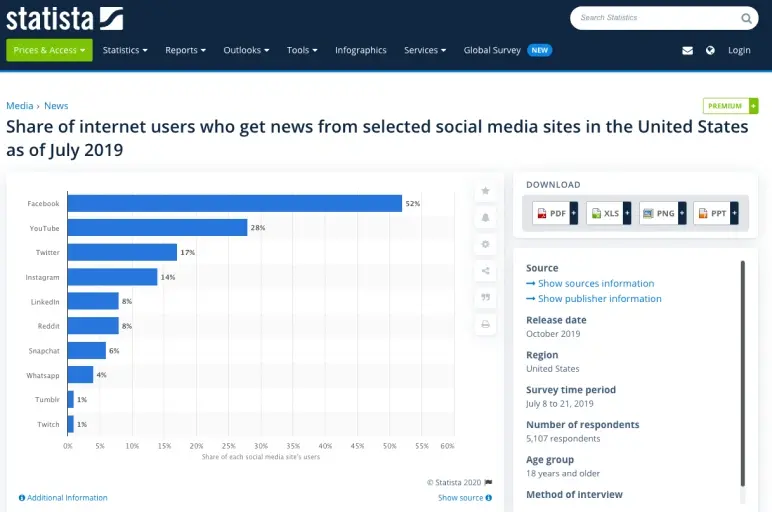
Over the years, I’ve lost count of how many times Statista has saved me hours of research. It’s one of the most trusted sources for statistical data, covering industries, countries, and topics from every angle you can imagine.
However, the real drawback of Statista is that free access only provides a glimpse; if you need detailed data or insights, you must switch to the paid version.
That said, Statista remains one of the best data platforms. What makes it even better is how it presents information in a structured, easy-to-digest format using graphs, infographics, and charts.
Here are a few features that make Statista unique:
- Industry reports covering 170+ sectors worldwide.
- Country-specific data with reliable sources.
- Customizable research platform for personalized insights.
- Ready-to-use charts and infographics for presentations.
- Regularly updated database with fresh statistics.
Remember, if you’re a large enterprise or need deep insights into specific aspects of your business, Statista is a great choice. But for small businesses or startups, the subscription cost can feel quite heavy.
“Statista offers credible stats, but reports are paywalled—best for enterprise and industries.”
3. Google Forms: Survey and feedback
| Section | Details |
|---|---|
| Audience | Startups, small businesses, and independent researchers |
| Rating | ⭐⭐⭐⭐ ½ 4.6/5 |
| Key Strength | Simple, free, and effective for primary data collection |
| Best For | Quick audience surveys and feedback gathering |
| Pricing | Free |
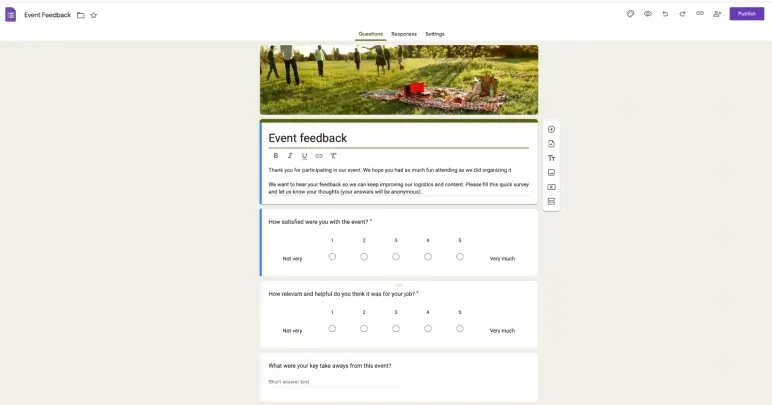
Sometimes, the simplest tools are the most effective—and Google Forms is proof. I’ve used it countless times to collect feedback from customers, run quick surveys, or validate business ideas before investing more time and money.
It’s free, easy to use, and works right inside your Google account, which means no setup headaches.
The biggest drawback of Google Forms is the manual grind. You set it up, chase responses, and then spend hours cleaning and extracting data across tabs. In today’s AI era, that feels outdated and heavy.
Still, if all you need is quick product feedback or a few suggestions, it does the job just fine. Here are a few features that make Google Forms worth keeping in your toolkit as a founder:
- Instant validation of ideas by running quick surveys with your target users.
- Seamless export to Sheets, so you can turn raw feedback into insights without extra tools.
- Team collaboration makes it easy for co-founders or teammates to refine questions together.
“Google Forms are easy surveys, but lack logic—best for startups and small businesses.”
4. GWI: Audience analysis
| Section | Details |
|---|---|
| Audience | Marketers, agencies, and established businesses |
| Rating | ⭐⭐⭐⭐ 4.8/5 |
| Key Strength | Deep, behavior-based audience insights |
| Best For | Understanding consumer behaviors and preferences |
| Pricing | Free trial with limited access Plus: $150/user Pro: Custom price is also available |
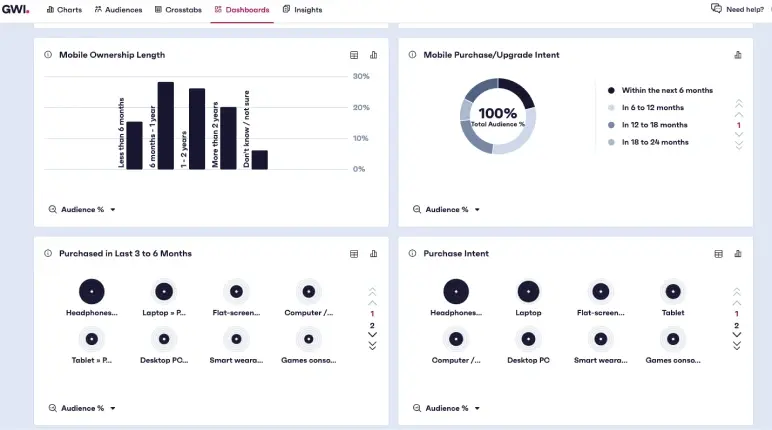
If you’ve ever wished you could peek straight into the minds of your target audience, GWI is about as close as it gets. I first came across it while working on a consumer-focused business plan, and the depth of its audience insights truly impressed me.
GWI doesn’t just give you demographic data; it tells you what your audience cares about, how they behave online, and even what influences their purchase decisions.
That said, when I first used it, I did feel a bit overwhelmed—the platform is so data-rich that it takes time to filter through and find exactly what’s relevant. And for smaller businesses, the pricing can feel on the higher side, around $150 just to access basic audience insights. This can be a lot if you’re not yet focused on scaling.
Here are a few features that make GWI stand out:
- Access to rich audience profiles across 50+ markets.
- Insights into customer behaviors, attitudes, and motivations.
- Ready-made dashboards with visualized data for quick analysis.
- Integration options to bring audience data into your own tools.
“GWI has broad insights, but shallow for niches—works for marketers.”
5. Google Analytics: Website traffic and analysis
| Section | Details |
|---|---|
| Audience | Startups, marketers, and businesses with a website or app |
| Rating | ⭐⭐⭐⭐ ½ 4.6/5 |
| Key Strength | Real-time insights into actual customer behavior |
| Best For | Understanding your audience through first-party data |
| Pricing | Free |
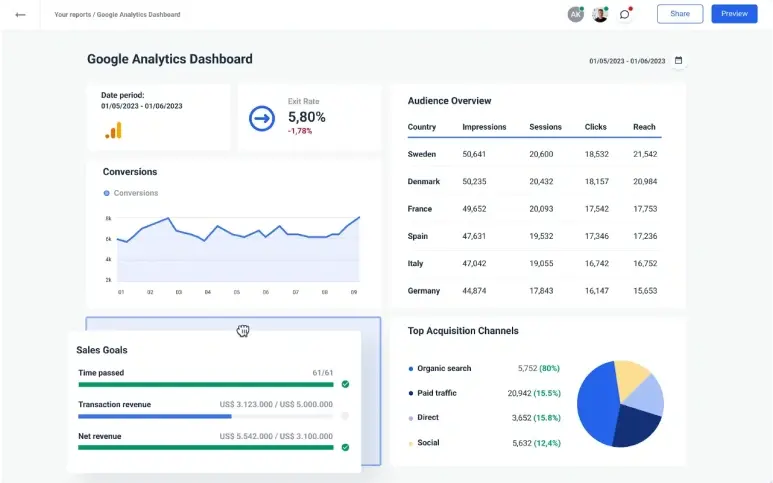
Google Analytics shows who your audience is, what they do, and what they want—all from real user behavior. But if you know how to read its data, it can reveal more about your audience than many expensive platforms, helping with your research.
I’ve used it countless times to understand exactly who’s visiting a site, how they found it, what they do once they’re there, and where we’re losing them.
But here’s the limitation—Google Analytics can only tell you what’s happening on your site. It won’t explain why visitors behave the way they do or what’s driving their decisions. For deeper insights like customer motivations, market trends, or industry data, you’ll still need to rely on other research tools.
That said, as a foundation for audience research, it’s hard to beat. It’s free, integrates seamlessly with other Google products, and provides real-time reporting that many paid platforms can’t match.
A few features that make Google Analytics powerful:
- Detailed insights into user demographics, devices, and locations.
- Behavior flow reports show exactly how visitors move across pages.
- Conversion tracking to measure sign-ups, sales, or other key actions.
- Integration with Google Ads for sharper campaign performance insights.
Remember, Google Analytics may work wonders to find your audience, but it lacks depth for complete market research.
“Google Analytics provides great traffic data, but not full research—only works for site owners.”
6. Ahrefs: SEO and competitor research
| Section | Details |
|---|---|
| Audience | Startups, marketers, and businesses with a website or app |
| Rating | ⭐⭐⭐⭐⭐ ½ 4.6/5 |
| Key Strength | Real-time insights into actual customer behavior |
| Best For | Understanding your audience through first-party data |
| Pricing | Free |
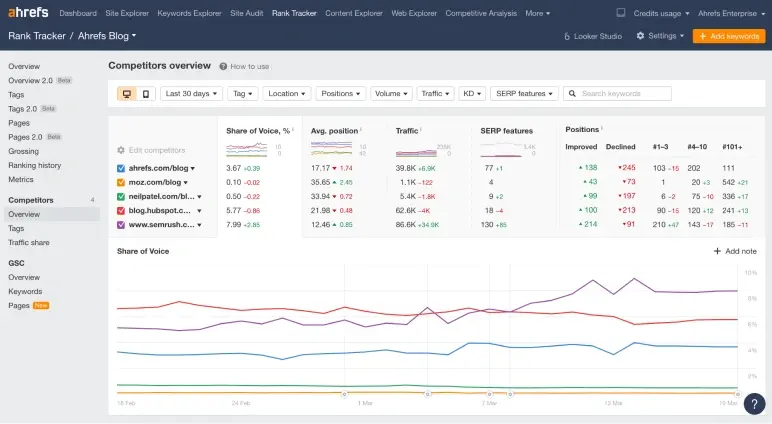
If you want to know what’s working for your competitors, Ahrefs is gold. You can see which keywords they rank for, what content pulls the most traffic, and where their backlinks come from. I often use it to spot gaps in the market—places where demand exists but no one’s serving it well yet.
The only catch? Ahrefs shines brightest for SEO and competitor analysis, but it doesn’t give you the full picture of customer behavior or market trends on its own. Still, if your strategy relies heavily on organic traffic, it’s one of the most powerful tools you can have in your kit.
A few features that make Ahrefs stand out:
- Comprehensive keyword research with search volume and difficulty.
- Detailed backlink analysis to track competitors’ link-building.
- Content gap tool to uncover untapped opportunities.
- Site audit feature to keep your website healthy and optimized.
“Ahrefs is a strong SEO tool, but limited on behavior—best for content teams.”
7. Sprout Social: Social media analytics
| Section | Details |
|---|---|
| Audience | Social media managers, marketers, and brands |
| Rating | ⭐⭐⭐⭐ ½ 4.6/5 |
| Key Strength | Deep social media analytics and engagement tracking |
| Best For | Understanding and engaging your social audience |
| Pricing | Standard at $199/month Professional at $299/month Advance at $399/month |
When it comes to understanding your audience’s behavior on social media, Sprout Social is one of my go-to tools. I first discovered it while reviewing a business plan, and the results I saw were so impressive that I immediately checked it out myself.
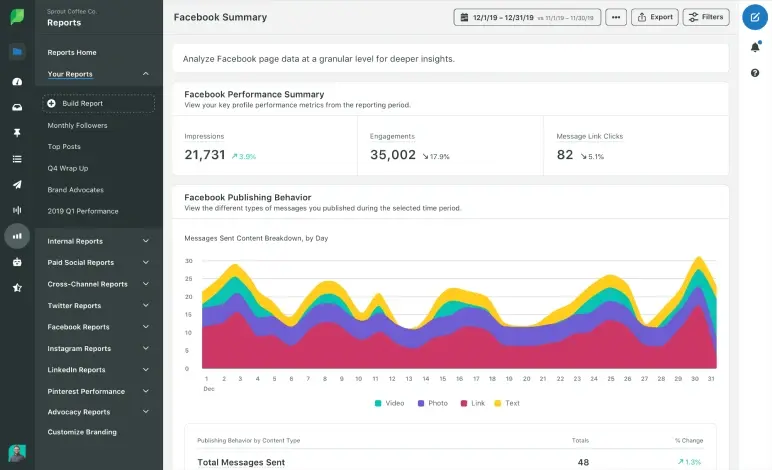
It proved just as effective—showing exactly what content sparks engagement, when your audience is most active, and how your brand is perceived online. One feature I particularly like is its sentiment analysis, which helps you see the tone behind customer conversations.
The only drawback I’ve noticed is that while it gives you detailed social data, it doesn’t always dig deep into why the behavior is happening. You still need to combine it with other research tools to get the full picture of audience motivations.
Again, it’s not a full-fledged market research tool, but for social behavior and engagement insights, it’s hard to beat.
Here are a few standout features:
- Social listening tools to track conversations and brand mentions across platforms.
- Competitor benchmarking to compare your performance with industry peers.
- Content performance analytics that highlight top posts and engagement drivers.
“Sprout Social tracks engagement, but is light on motives. Works well for social managers.”
8. BuzzSumo: Content trends & influencer research
| Section | Details |
|---|---|
| Audience | Content marketers, SEO professionals, PR teams |
| Rating | ⭐⭐⭐⭐ ½ 4.7/5 |
| Key Strength | Identifying high-performing content and trending topics |
| Best For | Content strategy and influencer outreach |
| Pricing | Starts at $119/month |
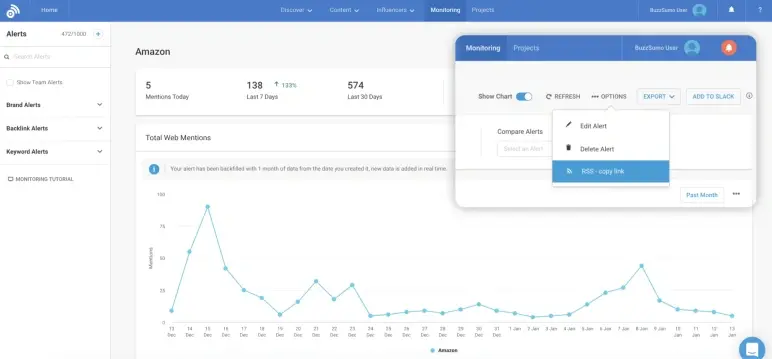
When I need to figure out what content is working in a niche, BuzzSumo is the tool I turn to. I first stumbled upon it while helping a founder refine their content strategy; we needed hard proof of what topics and formats their audience engaged with.
BuzzSumo delivered, showing us the exact pieces that had gone viral, who shared them, and what made them tick.
To be honest, using BuzzSumo was really worth it to identify high-performing content, but what makes me wonder is their pricing. It’s too high for small businesses and startups, especially for businesses that are struggling with funding.
However, even after spending those dollars, you’ll only get a digital marketing view—not a complete market analysis. But if your focus is purely on digital marketing research, this platform does the job really well.
Here are some of its key features:
- Tracks social engagement trends across platforms in real time.
- Provides competitor benchmarking to see how you stack up.
- Offers detailed reports on content performance and audience growth.
- Includes sentiment analysis to gauge audience tone and feedback.
“BuzzSumo helps you find trends, but no audience depth—best for PR teams.”
9. Tableau: Data visualization
| Section | Details |
|---|---|
| Audience | Data analysts, business owners, marketing teams |
| Rating | ⭐⭐⭐⭐ ½ 4.8/5 |
| Key Strength | Turning raw data into clear, interactive visualizations |
| Best For | Data visualization and advanced analytics |
| Pricing | Enterprise Creator at $115/user Enterprise Explorer at $70/user Enterprise Viewer at $35/user |
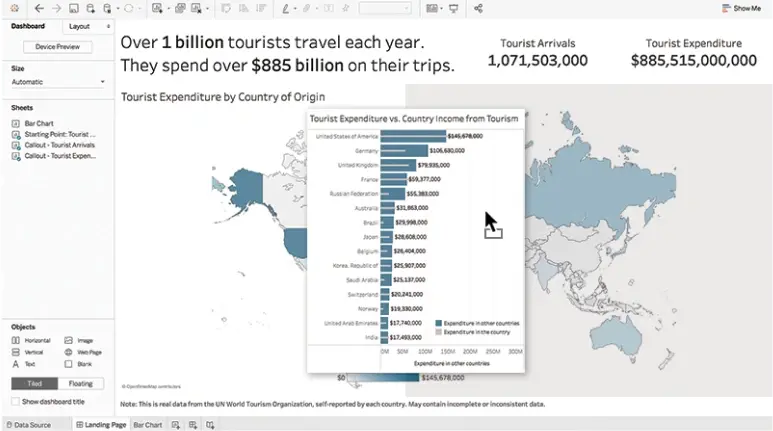
Tableau is a powerful data visualization platform that turns massive datasets into clear, interactive dashboards. Businesses use it to track KPIs, uncover trends, and make data-backed decisions without drowning in spreadsheets.
I first got to know about this market research software during a LinkedIn live session on market analysis. A retail founder shared how they used it to track sales patterns across 50+ stores.
The way they pinpointed peak buying hours and optimized staffing blew me away, so I decided to explore it myself and quickly saw why it’s a favorite among data-heavy teams.
But, the features aren’t easy to get on hand easily—it takes time (and sometimes a skilled analyst) to structure the data properly. Tableau is fantastic for visualization, but it won’t do the research or analysis for you. You still need solid data sources and clear objectives to make the most of it.
The features that make Tableau different from others are:
- Turn raw data into clear, dynamic visualizations.
- Connect with live data sources for up-to-date insights.
- Build charts and reports without complex coding.
- Works with Excel, SQL, Google Analytics, and more.
“Tableau has a steep learning curve—works best for teams with analysts.”
10. Answer The Public: Keyword research
| Section | Details |
|---|---|
| Audience | Content marketers, SEO professionals, and startups building content strategies |
| Rating | ⭐⭐⭐⭐ ½ 4.7/5 |
| Key Strength | Turns search queries into clear, visual insights |
| Best For | Finding content gaps and audience questions |
| Pricing | Free plan available; Pro from $9/month |
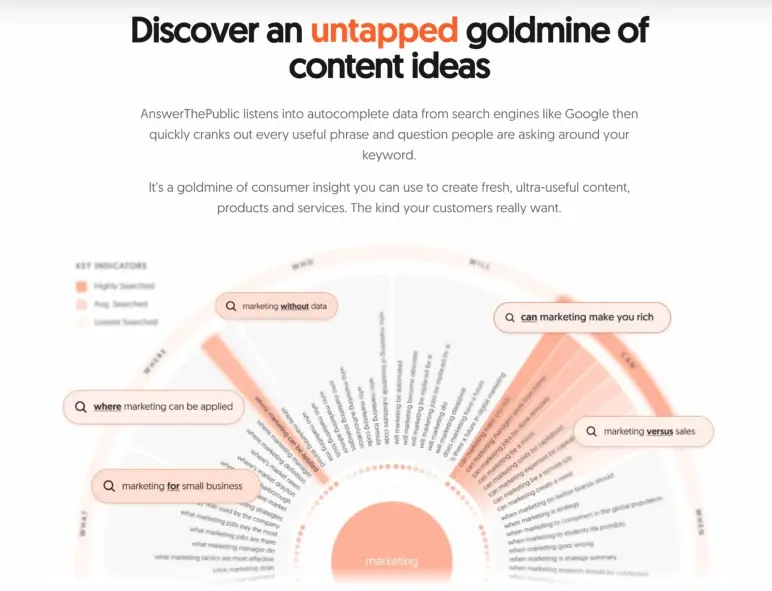
AnswerThePublic might look quirky at first—a visual wheel of search queries spiraling out from your keyword, but don’t let that fool you. This tool taps into Google’s autocomplete data to show exactly what people are asking online.
For me, it’s been a goldmine for uncovering hidden audience questions I would’ve never guessed. I first used it while researching content ideas for a startup’s marketing plan, and in minutes, I had dozens of authentic, search-driven questions we could answer in our blog.
The drawback? While it’s amazing for sparking ideas, it doesn’t give you the “why” behind those searches or the depth of actual market data. So if you’re relying on it for full-fledged research, you’ll need to combine it with other tools.
Features
- Visualizes search questions, comparisons, and prepositions.
- Pulls real-time data from Google autocomplete.
- Exports keyword insights in CSV format.
“AnswerThePublic shows queries, but not intent—best for SEO writers.”
How to choose the right market research tool?
Choosing the right market research tool isn’t about grabbing the most popular name on the internet—it’s about finding a platform that truly fits your needs. The right choice depends on your business goals, stage, budget, and the type of insights you want.
A small startup, for example, might benefit from an all-in-one platform like Upmetrics that combines market research with business planning, pitch deck creation, and financial forecasting—saving time and keeping everything in one place.
Larger companies, on the other hand, might prefer specialized, advanced tools. You should always consider how easily the tool integrates into your workflow, how actionable the data is, and whether it supports your decision-making process without overwhelming you with noise.
Here are a few tips that you should consider while choosing a market research tool:
- Start with your research goal, and know exactly what you want to achieve.
- Match it to your business stage, look for flexible, multi-feature tools.
- Focus on actionable insights, not just raw data.
- Choose tools that fit into your existing business planning process.
- Run a small test before committing long-term.
- Think long-term scalability to avoid frequent switches.
Conclusion
The right market research tools don’t just give you data, they reveal patterns, opportunities, and blind spots you might otherwise miss. Hence, in this guide, we’ve explored the best market research tools, each valuable for different goals, budgets, and stages of growth.
But here’s a common pain point I’ve noticed: Gathering insights is one thing, turning them into a clear, actionable plan is another. That’s where an AI business plan generator can be a game changer; it helps transform all that research into a concrete strategy without hours of manual work.
Whatever tools you choose, make sure they don’t just collect numbers but drive your next big move. Here’s to smarter decisions and stronger businesses—good luck!
